Ten posts. A careful refresh. An honest follow-up.
Before your next new post, revisit ten old ones.
Start with one useful post. Answer the questions customers ask AI, improve the page, and record what happens. Use our free WordPress GEO tools or the challenge worksheet.
Free Core + SEO plugins · WordPress 6.5+ · PHP 7.4+
No account, API key, or credits needed for the GEO tools.
Here for the worksheet? Download the free challenge kit — no email required.
Try this on one existing post
A short GEO walkthrough
Generative engine optimization starts with useful answers. After checking your public page in AI Suite → AI Visibility, use these three steps to improve it.
Prepared example: a page comparing WordPress GEO tools. The sample answer below describes FounderPostAI’s actual features; write facts that match your own page.
Map the next question
In AI Suite → GEO Planner, set your topic, audience, and goal. Map the questions to an existing public page.
- DiscoverWhat are WordPress GEO tools?
- CompareCan I use my existing SEO plugin?
- Check fitWhat can I use without credits?
- DecideWill my FAQ answers remain if I deactivate?
Fill one answer gap
Add the FounderPostAI GEO FAQ block in the WordPress block editor. Write a direct answer, then publish through the normal save action.
Example FAQ answer
Will my FAQ answers remain if I deactivate?
Yes. The GEO FAQ block saves readable questions and answers in your page content. Visitors can still read that text after you deactivate the plugin. The plugin’s optional FAQ structured data stops appearing. Export your separate GEO plan and observation log before uninstalling, because uninstalling deletes those local records.
Check the actual response
Ask your saved questions in order in a fresh assistant conversation. In the planner’s manual AI answer log, record what you observe.
- Assistant, model, mode, and date
- Whether it mentioned your business
- The URLs it actually cited
- A short note with the evidence
No test results are shown in this example. You run the tests yourself; the plugin does not query assistants automatically or guarantee citations.
Try the workflow on your own site
Install free Core, then free SEO. The GEO tools need no account connection, API key, or credits.
Already have Core? Install the free SEO module. Read the full GEO guide.
Start smaller · A repeatable WordPress tutorial
Refresh five neglected posts, one decision at a time.
Choose five useful articles, record a baseline, then test a title, description, or internal link on one post before repeating. You can follow this method manually or use FounderPostAI’s review queue. The ten-post challenge is there when you’re ready to expand.
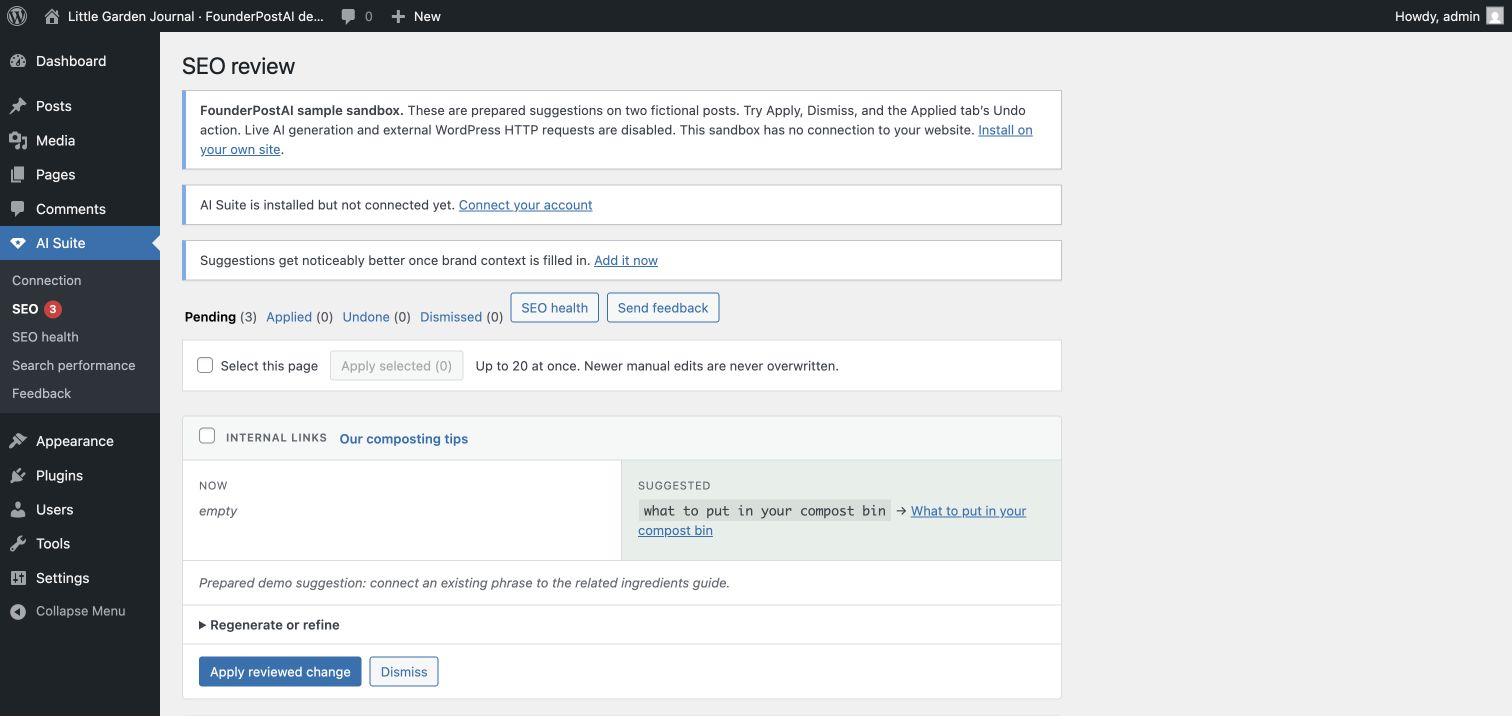
- 01
Pick five pages with a clear reason to improve
Select accurate articles that still help your audience. For each, write the specific problem: a vague search title, a generic description, a missing useful link, or an unanswered customer question. Avoid changing URLs or rewriting every paragraph as part of this first trial.
- 02
Save the baseline and the original wording
For each URL, record a complete 28-day Search Console period, queries, clicks, impressions, CTR, and average position. Save the title, description, relevant paragraph, and backup or revision reference. Keep the property, search type, country, and device filters for the follow-up. If data is insufficient, say so.
- 03
Review one change on the first post
For the prepared composting post, “Our composting tips” becomes “Composting in a Small Garden: A Beginner’s Guide.” The existing phrase “what to put in your compost bin” can link to the published ingredients guide. Both choices are grounded in the sample article; neither adds a new claim about results.
This is fictional teaching content from the sandbox, not a customer case study or live AI output. See the matching description example or try applying a prepared suggestion.
- 04
Check the result, then repeat on the other four
Inspect the public page and the saved SEO field after applying. Check that an inserted link goes to the intended article and still reads naturally. Try Undo on the first change before expanding. For each remaining post, accept, edit, or reject the proposal and record why. Keep your existing SEO plugin active.
Rank Math users can follow the native-field verification checklist. Free Core and SEO include manual review; live generation requires a site connection and uses its managed action allowance or your Anthropic key.
- 05
Record what happened, including no change
After search engines revisit the pages, compare an equivalent complete period using the saved filters. Report each page separately and include other releases, seasonality, and changes in search demand. Track accepted, edited, and rejected suggestions as workflow evidence. Traffic movement alone cannot show that the refresh caused it.
Turn your five-page log into a useful report
Keep one row per URL: problem → original value → approved change → date → verification → baseline → follow-up → competing explanations. Report mixed results and missing data. You can share the worksheet and tutorial freely; publishing a client’s name, screenshots, or analytics needs their agreement.
No measured traffic results are claimed by this walkthrough. It gives you a procedure and a place to record your own evidence.
Make it a ten-post project
The free kit includes a selection checklist, change log, and follow-up worksheet. Use it yourself or with a client. No email required to download it.
The kit is a plain-text Markdown document you can copy into your own notes or project tool.
Help shape the first pilot
We’re gathering interest for a small first group, aiming for five WordPress sites. Tell us about your archive if you’d like to explore a guided refresh session.
We’ll agree scope and timing before any session. Participation does not require a review or a public testimonial.
A small, repeatable project
- 01
Choose ten worthwhile posts
Pick accurate, useful articles that still matter to your audience. Start with pages that already earn impressions or answer questions your customers still ask.
- 02
Record a baseline
Save a consistent 28-day Search Console view for those pages: clicks, impressions, CTR, and average position. Note the dates and any seasonal context.
- 03
Make a considered refresh
Review the title and description against what the post actually says. Add a relevant internal link where the existing wording makes sense. Record each change and its date.
- 04
Check back and share what happened
Compare an equivalent period after search engines have had time to revisit the pages. Record improvements, declines, and no-change results. Traffic changes alone do not prove the refresh caused them.
Interested in a guided session?
Tell us where your site is and what you want to improve. We’ll keep your details in our private project inbox.
Published · Updated