FounderPostAI + Rank Math
Use safe AI SEO automation alongside Rank Math
The short answer: FounderPostAI saves approved title and description values into Rank Math’s native metadata fields and suppresses its own standalone head output while Rank Math is active. That adds an AI review workflow without creating a second SEO stack.
By FounderPostAI · Published · Updated
See it before you install
A one-post trial alongside Rank Math
Keep Rank Math active. Install Core and SEO, try the free local tools, and connect only when you want AI-generated suggestions. Test one published post before expanding to a batch. The check below is a procedure to repeat on your site, not a claim that every theme and plugin combination has been tested.
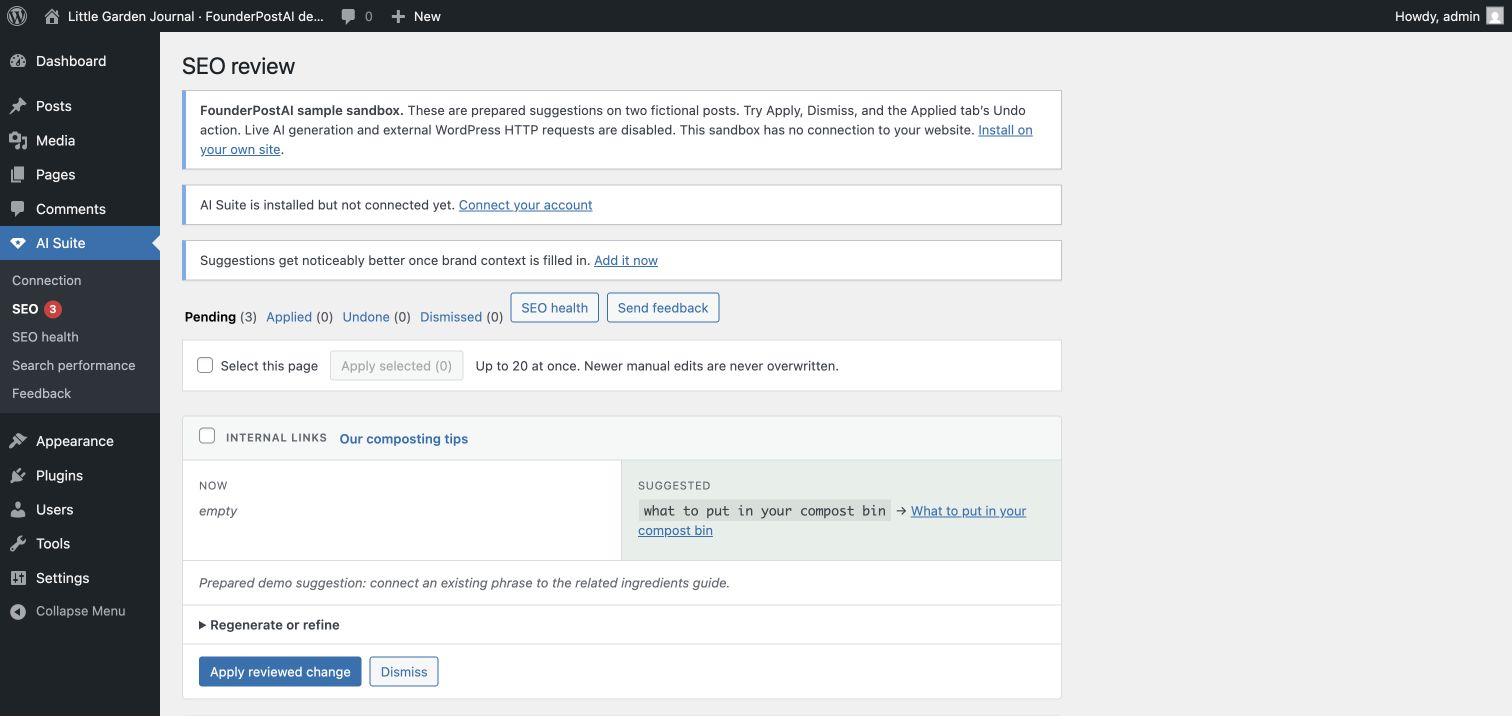
Verify the integration on your own post
- Save the current SEO title and description from Rank Math, along with the public page URL. Keep your normal backup or staging process.
- In AI Suite → SEO, analyze the post after connecting, then review and apply one title or description. Keep Pro auto-apply off for this trial.
- Reopen the post editor and inspect Rank Math’s title and description fields. Check the public page source for the approved value and one canonical tag; clear your normal page cache if necessary.
- Use the Applied tab’s Undo action, then reopen the editor and public page to confirm the previous value. Undo refuses to overwrite a newer edit; resolve the current value manually if needed.
If output differs from the saved value, check page caching, Rank Math templates, and other plugins that filter metadata. Save the versions and exact steps when contacting support.
Who this workflow is for
- Best for
- Rank Math sites that need editorial review, revisions, and bulk AI workflows
- Works with
- Rank Math on singular WordPress posts and pages
- Practical outcome
- Reviewable AI suggestions rendered through the existing Rank Math output path
What matters in practice
A workflow you can inspect, test, and reverse.
Avoid two plugins competing for metadata
AI Suite checks whether Rank Math is active before deciding how to output approved metadata. Rank Math continues to control the document head and the rest of its SEO configuration.
- Updates Rank Math’s native title and description fields
- Does not add a second canonical tag
- Leaves Rank Math schema and sitemap settings untouched
Review AI output against the live page
The suggestion is created from the current WordPress content and saved brand rules. Editors can inspect the current and proposed values together rather than accepting a black-box rewrite.
- Suggestions remain pending until reviewed
- Each result is tied to the analyzed content state
- Manual edits made later take precedence
Add internal links without changing Rank Math
Internal-link proposals use published WordPress destinations and exact source text. The workflow is independent from Rank Math’s frontend output and can be reviewed on its own merits.
- Real on-site destinations only
- No invented anchor text
- Revision-first content changes
A practical sequence
Put the workflow into practice
- 01
Keep the existing Rank Math configuration
AI Suite does not require an SEO-plugin migration.
- 02
Install the two free plugins
Install and activate Core, then SEO, from WordPress.org. AI Visibility, GEO planning, the FAQ block, and the manual answer log work without an account or credits.
- 03
Connect only for AI suggestions
Use AI Suite → Connection when you want generated titles, descriptions, or links. Choose managed credits or your own Anthropic key, analyze one post, and approve selectively from the review queue.
- 04
Verify the value and try undo
Reopen Rank Math’s native fields and inspect the public page source after applying. Use the Applied tab to undo the trial before expanding to a batch. Keep Rank Math responsible for schema, sitemaps, and canonical output.
Boundaries matter
What this workflow does not promise
- No duplicate metadata block from AI Suite
- No replacement of Rank Math’s sitemap, schema, or redirect tools
- No unattended edit unless the site owner enables a Pro automation rule
- No older pending suggestion replacing newer content
Common questions
Can Rank Math stay active with FounderPostAI?
Yes. Keep Rank Math active and responsible for frontend SEO output. FounderPostAI saves approved titles and descriptions into its native metadata fields and suppresses its own standalone metadata output. Start with one published post, then inspect the saved fields and public page source before rolling the workflow out to more content.
Does FounderPostAI use Rank Math Content AI?
No. FounderPostAI has its own suggestion and review workflow; it does not spend Rank Math Content AI credits. Generating titles, descriptions, and links requires a connected site with FounderPostAI managed credits or your own Anthropic key. Its free local GEO tools and AI Visibility checks do not require that connection.
Will it change Rank Math schema, sitemaps, or redirects?
No. The metadata integration writes approved title and description values; it does not migrate Rank Math settings or replace its schema, sitemap, or redirect tools. Internal-link changes are saved in WordPress content. If you use the separate GEO FAQ block, leave its optional FAQ schema off when another tool already marks up those same answers.
What can I try without an account or AI credits?
Install free Core and SEO to run AI Visibility checks, map questions in the GEO Planner, write FAQ answers, and record manual assistant observations. These tools need no account connection. The public demo and temporary WordPress sandbox also show prepared review suggestions. Live AI generation is a separate, optional step with processing costs.
Can I undo an approved title or description?
Yes. The Applied tab provides an Undo action for a reviewed change, provided the current value still matches what was applied. A newer manual edit is protected from being overwritten. Save the original values and test applying and undoing one change before using a larger batch on your own site.
Continue researching
Related WordPress SEO resources
Try the review workflow on a real WordPress page.
Install free AI Suite Core and AI Suite SEO from WordPress.org. Activate Core first, then SEO. Review suggestions before applying them.