Constrained WordPress internal links
A WordPress internal linking plugin designed not to invent links
The short answer: FounderPostAI gives the model a closed list of real published destinations and accepts a suggestion only when the exact anchor phrase already exists as ordinary text in the source page. The inserter skips headings, code, shortcodes, and existing links.
By FounderPostAI · Published · Updated
A link, not a rewrite
One paragraph. One useful next step.
The fictional WordPress sandbox contains a published post called “Our composting tips” and a separate ingredients guide. The source already says “what to put in your compost bin”. Its prepared suggestion links those words to the guide without rewriting the sentence.
01 / Before approval
If you are unsure what to put in your compost bin, start with vegetable scraps, dry leaves, and plain cardboard.
The anchor is already part of the sentence. No new copy is needed.
02 / After approval
If you are unsure what to put in your compost bin, start with vegetable scraps, dry leaves, and plain cardboard.
Only the existing phrase becomes a link to the approved, published guide.
- Source
- Our composting tips
- Destination
- What to put in your compost bin, a separate published post
- Editorial reason
- The reader can see an ingredients list at the moment it becomes useful
Inspect the before-and-after HTML
Before
<p>If you are unsure what to put in your compost bin, start with vegetable scraps, dry leaves, and plain cardboard.</p>After
<p>If you are unsure <a href="/compost-ingredients/">what to put in your compost bin</a>, start with vegetable scraps, dry leaves, and plain cardboard.</p>This simplified HTML shows the ordinary anchor the plugin saves. The temporary sandbox uses its own full permalink for the same destination; the link is not a shortcode that depends on the plugin staying active.
When the same suggestion should not be applied
Only in a heading
If the phrase appears only in an H2, the inserter leaves it alone. Heading text is protected; the anchor must have an eligible occurrence in ordinary content.
Already linked or split by markup
An existing link is not replaced or nested. A phrase split across separate HTML text nodes is not forced together to create a match.
The page changed after analysis
Newer source edits make the suggestion stale. A destination that became a draft also fails revalidation. Review fresh results instead of overwriting the live state.
Repeat these steps in the WordPress sandbox or read the safe internal-linking guide. If link auditing is your main job, compare FounderPostAI and Link Whisper before choosing a workflow.
See it before you install
Inspect the actual WordPress review queue
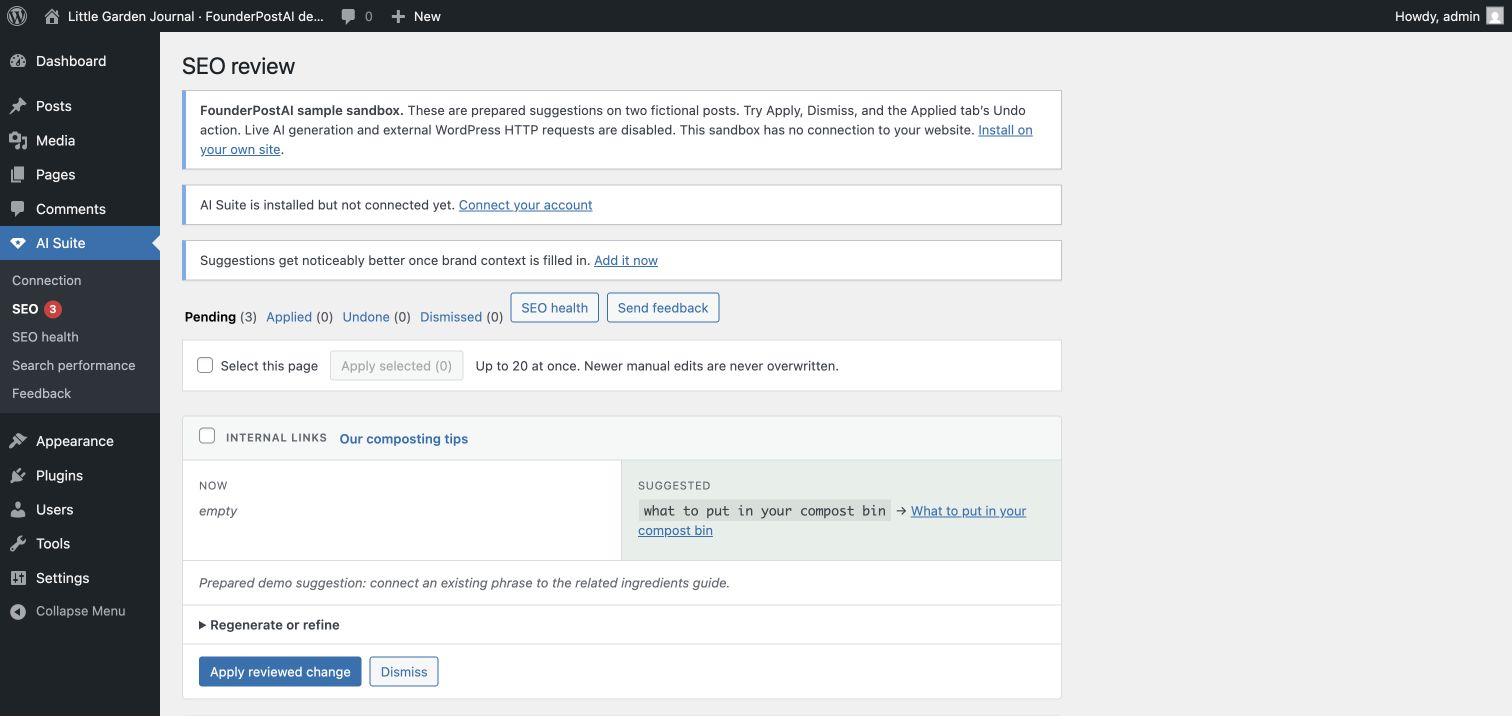
Each pending suggestion shows what will change before you approve it. In this prepared example, the phrase “what to put in your compost bin” already exists in the source post and points to a separate, published ingredients guide.
What to check before approving
- The existing phrase reads naturally as a link and the destination helps the reader.
- The destination is published and the link appears in the expected paragraph or list item.
- After applying, inspect the post and try Undo before repeating the workflow on more pages.
Who this workflow is for
- Best for
- Editors who want contextual suggestions with conservative insertion rules
- Works with
- Published WordPress posts and pages in the Block or Classic Editor
- Practical outcome
- Reviewable source, destination, and anchor combinations that WordPress can validate
What matters in practice
A workflow you can inspect, test, and reverse.
Start with a closed candidate set
The optimizer gathers real published posts and pages from the same WordPress site before asking for suggestions. The model chooses from those candidates rather than generating a destination URL from memory.
- Candidate IDs and permalinks come from WordPress
- Draft, private, and invented destinations are not offered
- The current page is excluded from its own candidate list
Require anchor text that already exists
A recommendation must identify an exact phrase already present in the source content. That constraint avoids dropping unnatural invented copy into an otherwise finished paragraph merely to create a link.
- Exact source phrase is checked before insertion
- Existing links are not nested or replaced
- The destination is revalidated when the suggestion is applied
Insert through WordPress-aware safeguards
In the Block Editor, insertion is limited to paragraph and list-item blocks, including eligible blocks nested inside groups or columns. In Classic Editor content, the inserter walks ordinary HTML text nodes. It leaves unsupported blocks and protected markup alone.
- Skips headings, code, preformatted text, and shortcodes
- Avoids block comments and existing anchor elements
- Saves a WordPress revision before changing content
A practical sequence
Put the workflow into practice
- 01
Install Core, connect, and add SEO
Install FounderPostAI – AI Suite Core and the free SEO module from WordPress.org, then connect Core under AI Suite → Connection. Choose a published source post and make sure the destination is also published on the same site.
- 02
Analyze one representative post
Choose “Optimize with AI Suite” from a post or page row, then open AI Suite → SEO to review the result. Check the destination, exact anchor phrase, and the suggested reason. A valid URL is not enough: the destination should genuinely expand on the source paragraph.
- 03
Apply, then inspect the live paragraph
Approve the link suggestion only after review. The plugin rechecks the source and destination, saves a revision, and inserts an ordinary link. Open the published page and follow it to confirm the wording, destination, and layout are right.
- 04
Keep or undo before scaling up
Use “Undo this change” on an applied suggestion if needed. Undo is blocked when newer edits would be overwritten; inspect WordPress revisions in that case. Once the sample is useful, repeat with the free ten-post analysis batches. Pro adds unattended scheduling and optional auto-apply.
Boundaries matter
What this workflow does not promise
- No model-generated destination URLs
- No invented anchor copy
- No insertion inside headings, code, shortcodes, or existing links
- No change without a WordPress revision first
Common questions
Will internal links remain if I deactivate the plugin?
Yes. Applied links are ordinary WordPress content. Deactivating AI Suite does not turn them into broken shortcodes or remove them.
Does it automatically add every suggestion?
The free workflow requires review. SEO Pro offers conservative auto-apply settings, but those settings are optional and still use the same validation rules.
Does it find broken links or orphan pages?
The SEO health dashboard includes local link counts and orphaned-content indicators. It is not a substitute for a dedicated broken-link crawler or the full reporting toolset of a specialist link-audit product.
Why did the plugin leave my paragraph unchanged?
The anchor may be absent, split across HTML elements, already linked, or inside a protected block. The source may also have changed since analysis, or the destination may no longer be published. Check the review message and analyze the current post again; do not remove safeguards just to force a link.
How much does the internal-linking workflow cost?
Core and the SEO module are free plugins, including manual review and repeatable ten-post analysis batches. AI processing uses the managed allowance or your configured Anthropic API billing; free plugin code does not mean unlimited free inference. The separately distributed Pro add-on contains unattended automation.
Will it link every occurrence of a phrase?
No. Each suggested link is inserted at most once, at its first eligible text occurrence. Matching preserves the original casing and rejects partial-word matches. Review placement for reader usefulness rather than aiming for a particular link count.
Continue researching
Related WordPress SEO resources
Try the review workflow on a real WordPress page.
Install free AI Suite Core and AI Suite SEO from WordPress.org. Activate Core first, then SEO. Review suggestions before applying them.